
Introduction
When creating a web form, your respondent's trust and security should be your top priority. To help you build trust and boost security, the FormAssembly team conducted a class outlining the most important principles of web form security. The class began with a series of three emails and concluded with a webinar.
This guide aims to help you understand and apply best practices for web form security. You can also use our FormAssembly Web Security Checklist to determine whether your web form meets the security standards outlined here.
Customer Expectations
When you ask your customers to fill out a form on your website, you are asking for a certain degree of trust. They are providing you with personal information, and by filling out your form, they are trusting you to handle their data safely and securely. In order to maintain this trust and to ensure the security of your customers' data, there are several things to keep in mind.
- Privacy Policy
- Brand Recognition
- Contact Information
- Encryption
- Authentication
- Data Types
Privacy Policy
Your privacy policy tells your customers how you will use their information. When you collect personal data, it's important to have an easily accessible privacy policy. If you don't have a privacy policy, it may be best to consult with a lawyer to help you with this process. To confirm that your customers have read your privacy policy, you might consider adding a check box:

Additionally, it’s worth considering adding your privacy policy to your website. The Privacy Policy applies anytime someone uses your Services. We offer our users choices about the data we collect, use, and share as described in this Privacy Policy, Cookie Policy, and Terms of Service.
Brand Recognition
When people open your form, they must recognize it as part of your organization. Since they are providing you with personal information, there should be no doubt in their mind about who you are. The look and feel of your web form should always be consistent with your website, with the same logos, style, and design.
Contact Information
Your form should include contact information so that your respondents can reach you. If you've embedded your form, your contact information may appear in the footer of your site; however, if not, you'll want to make sure to add that information to the form.
Encryption and Types of Data
Encryption
Encryption is the process of securing data and making it unreadable to people who do not have the key, which is usually the browser or the server. With TLS 1.2, you increase your form's security and help your customers feel more comfortable, especially when they are submitting sensitive or personal information.
Data sent using HTTPS is secured via Transport Layer Security protocol (TLS), which provides three key layers of protection:
Encryption—encrypting the exchanged data to keep it secure from eavesdroppers. That means that while the user is browsing a website, nobody can "listen" to their conversations, track their activities across multiple pages, or steal their information.
Data integrity—data cannot be modified or corrupted during transfer, intentionally or otherwise, without being detected.
Authentication—proves that your users communicate with the intended website. It protects against man-in-the-middle attacks and builds user trust, which translates into other business benefits.
If your website does not have a TLS certificate, you can direct respondents to the FormAssembly link to complete the form.
You can also take advantage of the Secure Browsing feature, which ensures that your connection is encrypted if you’re collecting sensitive information.

Types of Data
Depending on the types of data you collect, a variety of laws or security regulations may apply to your form. It's always important to make sure that you collect only the types of data that you actually need.
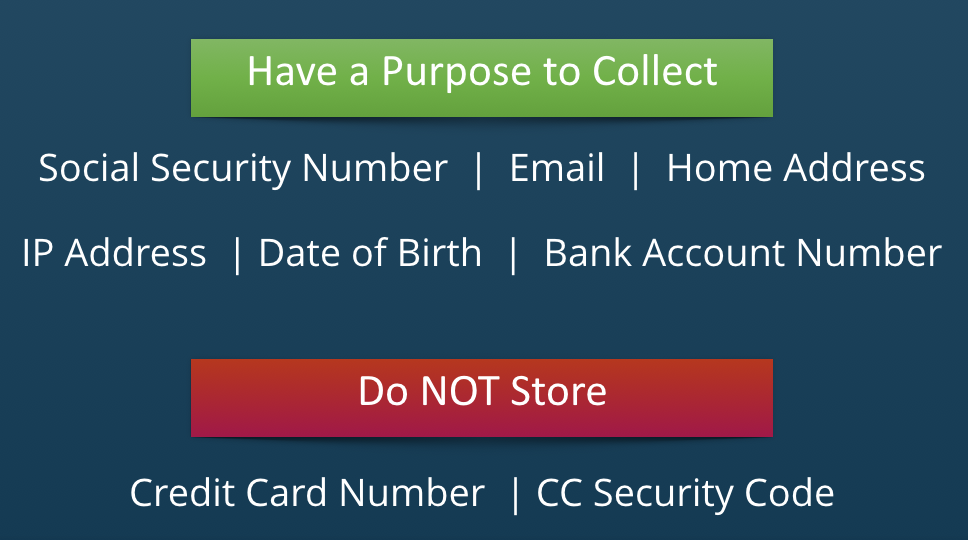
For example, if you are based in the United States but want to collect data in the EU, you will need to follow those requirements; however, FormAssembly has those controls baked into the product to help.

PCI Compliance
When building a form, it is incredibly important to adhere to all applicable laws concerning collecting and storing electronic data. PCI (Payment Card Industry) compliance governs the collection and use of credit card data.
You MUST collect credit card information through a PCI-compliant provider such as PayPal or Authorize.Net. FormAssembly is PCI DSS certified and meets the standards for PCI Compliance Level 1, which has the strictest requirements. We also offer integrations with PayPal, Stripe, CyberSource, FreshBooks, Authorize.Net, Chargent, and iATS Payments.
PCI password requirements are integrated with FormAssembly; this ensures that you’re following the controls to help protect your accounts.
HIPAA and ePHI Compliance
Special laws govern the collection of electronically protected health information (ePHI). In general, the content of the collected data is less important than who collects it and how it is handled. Since FormAssembly is now HIPAA compliant, you can collect ePHI, so long as you are a member of our Enterprise or Government Plans.

Did you know that PHI is any health information that can be tied to an individual, which, under HIPAA, means protected health information includes one or more of the following 18 identifiers?
Names (Full or last name and initial)
All geographical identifiers
Dates (other than year) directly related to an individual
Phone Numbers
Fax numbers
Email addresses
Social Security numbers
Medical record numbers
Health insurance beneficiary numbers
Account numbers
Certificate/license numbers
Vehicle identifiers (including serial numbers and license plate numbers)
Device identifiers and serial numbers;
Web Uniform Resource Locators (URLs)
Internet Protocol (IP) address numbers
Biometric identifiers, including finger, retinal, and voiceprints
Full face photographic images and any comparable images
Any other unique identifying number, characteristic, or code except the unique code assigned by the investigator to code the data
IP Anonymization
If you want to create a completely anonymous survey, simply leaving out a respondent's name and personal information is not enough: the location of the computer can still be determined by the user's IP address.
For Team, Enterprise, and Government Plan users, you can enable the IP Anonymization feature, which will replace the last half of the respondent's IP address with zeros. This guarantees that the IP address cannot be used to identify an individual computer or user.
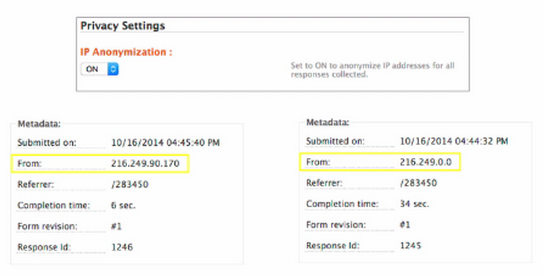
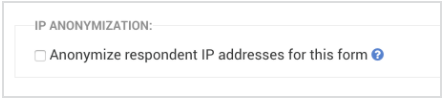
Additionally, for all users who must be in compliance with the GDPR, you can anonymize IP response addresses on a form-by-form basis.
eSignature
For a form that acts as a waiver or contract, you might want to include an eSignature. However, while a signature may feel like the most important part of such a form, it's just as important to include form fields that identify the respondent without question. In short, you want to collect as much information as possible to confirm who the person is signing the document.
Accessing Data
The number one rule for data access within FormAssembly is that your account credentials should never be shared between colleagues. Although this may be less convenient, it is incredibly important to know who accesses data and how they use it. However, to make things easier, we do allow Single Sign-On, which lets you sign into FormAssembly through Salesforce and/or Google Apps.
FormAssembly recommends using a third 3rd password management tool, such as LastPass, to store your passwords.
Secure Browsing and Purging
Secure Browsing
If you read responses from within FormAssembly and you collect sensitive data, you should enable secure browsing, which will enable TLS 1.2 throughout FormAssembly. If you are using FormAssembly through Salesforce, this is enabled by default. Additionally, if you're using the Enterprise edition, administrators can force this option on their users.

Purging
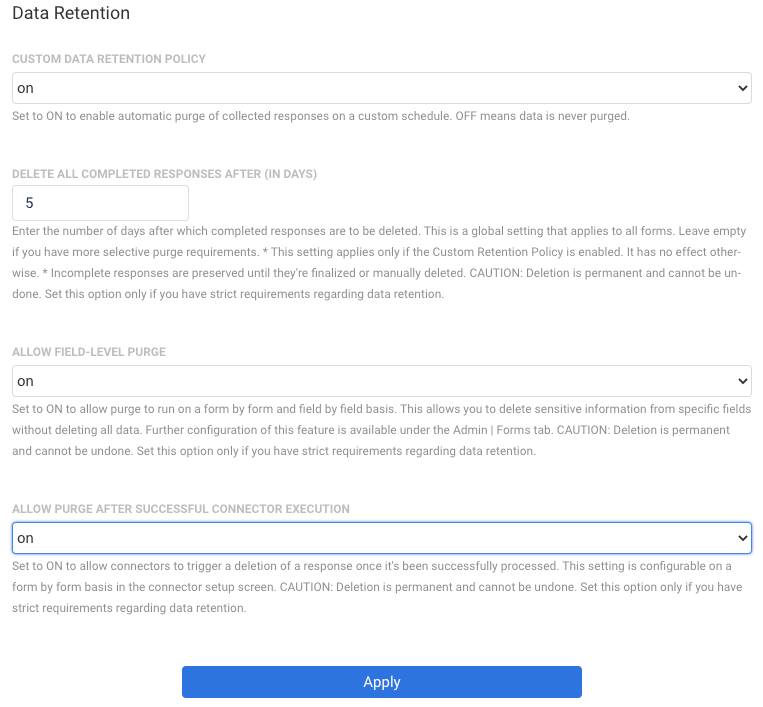
You can use our purge feature to automatically get rid of sensitive data in FormAssembly Team, Enterprise, and Government Plans. Doing this will help reduce the risks of data exposure and data theft. You can choose to automatically delete all responses or specific fields after a certain number of days or after the data is successfully sent to Salesforce.
If you visit the Admin Dashboard > Settings > Data Retention, you’ll be able to configure that setting.
Accessing Data from Other Apps
For connectors like Salesforce and Google Apps, any data that is transferred to those services is automatically encrypted. However, if you're using our Webhook Connector, data encryption depends on how the third-party service is configured. Once your data has left FormAssembly and is stored on a remote service, it is up to that company to ensure the privacy and security of your data.
It is also important to note that email notifications are not secure. Because of this, it is not a good idea to use email notifications to send any kind of sensitive data.
Enabling reCAPTCHA
If your form is collecting payments and is on a public website, we recommend enabling reCAPTCHA. Oftentimes, public forms that accept credit card information can be targeted by spambots, and the best prevention against receiving spam submissions is to enable reCAPTCHA on your form.

Using Moderation to Review Forms
For admins of Enterprise or Government Plans who would like additional control over their forms before they are live, you can use FormAssembly's moderation features.
By enabling form moderation, an admin will need to preview forms before they go live. This gives you control over what is published and available online, and what is not.
Managing User Permissions
Admins of Essentials Plans and above can also manage the different permissions that each FormAssembly user has access to. This can help control what your users can and cannot do within FormAssembly.
For example, if you want certain users to be able to access the connectors, and others not to have access, you can configure this in the permission settings.