
Managing Datasets
The Dataset List makes it easy to manage datasets you've imported to use with our Autosuggest feature. Datasets are useful when you want users to be able to choose from lists of options too long for a dropdown menu.
Active Datasets
Datasets that you've imported and are currently using will be shown in the Active Datasets section. This view contains information about the source of the dataset, the name, the language, the date it was created, the date it was last modified, and its visibility.
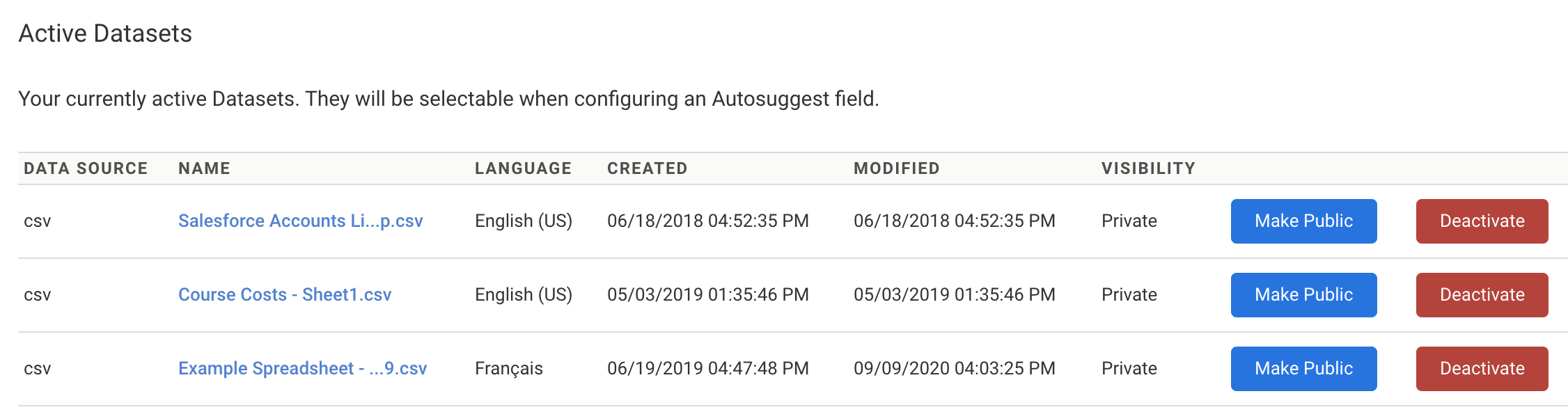
Click on a dataset's filename to access additional information about a dataset.
Click Make Public to make a dataset available to all users on your instance. By default, datasets will be set as Private, which means they can only be accessed by the user who imported them.
Click Deactivate to deactivate a given data set. This will remove the dataset from the existing datasets list you can access from within the Form Builder. Deactivating a dataset can be helpful if you don't plan to use it frequently or when using many datasets to manage the length of the existing datasets list. Deactivating a dataset does not delete it; instead, it will move to the Inactive Datasets section.
Inactive Datasets
Datasets you're not currently using are shown in the Inactive Datasets section. Like the Active Datasets section, this list contains information about the language of a dataset, the date it was created, the date it was last modified, and its visibility.

Click Reactivate to reactivate a data set. This will make the dataset accessible from your existing datasets list in the Form Builder.
Click Delete to permanently delete a dataset from your account. You should only delete a dataset if you're sure you won't need to use it again.
Accessing Datasets

If you are encountering a message that states that you do not have access to Datasets, contact your administrator. They may need to enable the datasets permission for your account.